
SmartConnect
PowerChute Link
SmartConnect's proven platform for Smart-UPS, now available for Back-UPS in point-of-sales and kiosk environments.
Get Started
Cloud-based Monitoring and Management for Distributed APC Back-UPS Deployments
PowerChute Link extends SmartConnect connectivity to supported APC Back-UPS devices using an internet connected Windows PC.
Stay informed about UPS events across remote locations, access device information remotely, and simplify management through a centralized SmartConnect experience.
Unlock Cloud-Based Management for Back-UPS
With PowerChute Link, SmartConnect extends visibility and remote monitoring to your Back-UPS devices
| Traditional Back-UPS Deployment | Back-UPS with SmartConnect |
|---|---|
| Wait for site personnel or customers to report issues | Receive automated notifications from connected devices |
| Visit sites to check UPS status | Monitor UPS status remotely |
| Separate tools and processes across UPS fleets | Centralized visibility across supported UPS fleets |
| Reactive maintenance planning | Better-informed maintenance planning |
| Limited evidence of power-quality problems | Increased visibility into power-quality issues |
Built for Distributed Self-Service Applications
Whenever a Back-UPS protects a customer-facing terminal, SmartConnect with PowerChute Link provides your team with automated notifications, remote visibility and information to help optimize on-site visits.

Retail Check-Outs
Self-checkout technology helps retailers serve more customers efficiently. UPS monitoring helps keep automated checkout lanes available and operating smoothly.
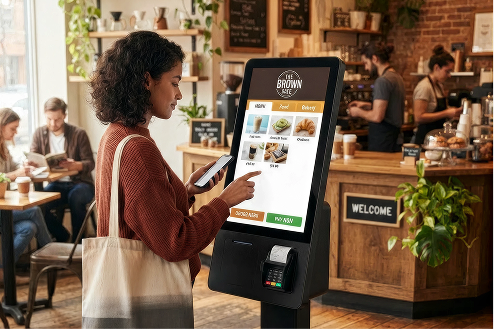
Restaurant Self-Order
Digital ordering kiosks increase basket value through visual merchandising and promotions. SmartConnect helps support the availability of these systems, protecting the value they deliver.

Medical Check-In Kiosks
Digital check-in systems improve data quality and improve back-end resource utilization. Power conditioning and remote management helps maintain that value-creating automation.
Supporting the Infrastructure Behind Value
Operational Efficiency
Automate routine transactions and serve more customers with fewer staff resources, reducing operating costs across distributed locations.
Customer Convenience
Enable faster check-ins, ordering, purchasing and service experiences while reducing queues and wait times.
Scalable Operations
Standardize self-service experiences across hundreds of sites, allowing organizations to expand without proportional increases in staffing.
Setting Up is Fast
Four simple steps to bring your Back-UPS devices to SmartConnect.
Connect Your Back-UPS
Connect your Back-UPS to an internet-connected Windows PC using USB, then turn it on.
Sign Up, or Log In
Sign up or log in to SmartConnect. The setup wizard provides a link to download PowerChute Serial Shutdown 1.6 or later.
Install the Lightweight Software Agent
Install PowerChute Link from within PowerChute Serial Shutdown and follow the steps to register your Back-UPS with SmartConnect.
View Your Back-UPS in SmartConnect
Customize notifications, device sharing, UPS names and map locations in SmartConnect.

Get started with PowerChute Link
Create a SmartConnect account or log in to your existing account to add PowerChute Link and start monitoring your Back-UPS devices today.